Locomotion System at GDC 2009!

The Game Developers Conference 2009 is near and I am proud to announce that my session proposal has been approved! I will be doing a 60-minute lecture in the Programming track on the subject of:
Dynamic Walking with Semi-Procedural Animation
(Follow the link to see the session description on the GDC website.)
I am honored to be presenting my work in the company of the great minds of the game industry at such an early point in my career. This is the second time I am going to GDC and I am truly looking forward to it.
Updated Interactive Demo
Now, since I'm updating the blog anyway, I have thrown in the latest version of the uneven terrain demo that I have used as a testing bed for the Locomotion System. New in this version is a coyote, as well as lots of visualization options that you can play around with to get an idea of the inner workings of the system. This is the same version that was used for the Video Demo 2 of the Locomotion System in the previous post.
Instructions for the demo
| Command | Keyboard | Gamepad |
|---|---|---|
| Walking-direction | arrow keys | analog stick 1 |
| Walking-speed | shift | - |
| Facing-direction | W, A, S, D | analog stick 2 |
| Jump | space | button A |
| Time slow down / speed up | numpad - / + | - |
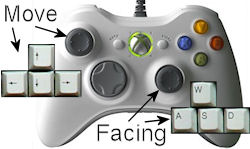
You can control the characters with either the keyboard or with a game pad. With a game pad, such as an XBox 360 controller, the direction and speed can be controlled precisely with ease, while independently controlling facing direction with the secondary stick.
In this demo the terrain can be dynamically controlled with the sliders at the top. You can create stairs, slopes, and various combinations. The terrain will reflect the changes once the character has walked a little distance to the left or right. Enable manual mode to control the character yourself, as described above. This demo uses four animations for walking (forward, backwards, and sideways) and also four for running.
In other news
Besides having my session at GDC accepted, a few other notable things have happened recently:
- I have moved from Aarhus to Copenhagen (both are cities in Denmark; Copenhagen is the capital) together with my girlfriend.
- I have started working at Unity Technologies, a company making an extremely cool game engine and authoring tool called Unity.
- I am still working on finishing my Master thesis about the locomotion system ... it will hopefully be done soon!
That's it for now. I hope to see you at GDC!
Video Demo 2 of Locomotion System
I've made a new video with voice-over demonstrating the capabilities of the now released Locomotion System, including the new features that enables it to be used with 4-legged animals:
In the video I explain the features of the system step by step in a straightforward manner while demonstrating the effects.
Locomotion System Released Now

The Locomotion System has been officially released last Friday concurrent with my presentation of it at Unite 2008. It is available for download at the Unity website:
From the website:
About
Take a look at how semi-procedural animation can dramatically improve the realism of animated humans and animals.Full Control of Style
Animators are experts in creating motions with specific styles and personalities. The Locomotion System uses keyframed or motion-captured animations as input and only adjusts them minimally to move the feet correctly in a dynamic and detailed environment.Full Control of Behavior
Move your character around by any means you desire, be it a CharacterController, a RigidBody, or your own custom movement logic. The Locomotion System simply observes the position, alignment, velocity and rotational velocity of your character and deduces everything from that, along with some raycasts onto the ground.Details
The Locomotion System automatically blends your keyframed or motion-captured walk and run cycles and then adjusts the movements of the bones in the legs to ensure that the feet step correctly on the ground. The system can adjust animations made for a specific speed and direction on a plain surface to any speed, direction, and curvature, on any surface, including arbitrary steps and slopes.License
The Locomotion System is available for free commercial and non-commercial use when used in a Unity game.The full license is included in the package.
Note
The Locomotion System is developed by Rune Skovbo Johansen in collaboration with Unity Technologies.
The presentation of the Locomotion System at Unite 2008 was received very well judging from the number of times the audience burst spontaneously into applause, and this Gamasutra article refers to the presentation as a "crowd favorite". I'll let you know when the video of the presentation is online.
If you are a Unity user and have any technical questions regarding the Locomotion System, please ask them on the Unity forums so more people can benefit from the questions and answers (and maybe notify me by email of your forum post if you want to be sure I see it quickly).
Locomotion System at Unite 2008

In a few weeks I'll be presenting the Locomotion System in a technical session at the Unite 2008 conference held at the Tycho Brahe Planetarium in Copenhagen, Denmark, October 22-24, 2008. My session will be held 13:30 on Friday, October 24th:
Walking and Running on Uneven Terrain
Speaker: Rune Skovbo Johansen
This session will present the free Locomotion System developed by Rune. The session will discuss how to let the system solve the complex tasks of blending multiple walk and run cycles and perform dynamic foot placement on uneven terrain while keeping animators and game programmers firmly in control of style and behavior.
See the Unite 2008 conference info and agenda.
The Locomotion System that I'm developing is for the Unity game engine, and Unite is the yearly Unity developer conference packed with presentations, technical sessions and special events.
Video Demo 1 of Locomotion System
I've made a video with voice-over demonstrating the capabilities of the Locomotion System I'm developing. The video is based on one of the interactive demos in the previous post.
You can look at this high-res Quicktime video (106 MB) or at the lower quality YouTube video embedded below:
In the video I explain the features of the system step by step in a straightforward manner while demonstrating the effects.
3 Demos and New Blending Feature
Lots of demos you can try this time - yay! Tip: For better performance, unload one demo before you view the next.
Instructions for all demos below
| Command | Keyboard | Gamepad |
|---|---|---|
| Walking-direction | arrow keys | analog stick 1 |
| Walking-speed | shift | - |
| Facing-direction | W, A, S, D | analog stick 2 |
| Jump | space | button A |
| Time slow down / speed up | numpad - / + | - |
You can control the characters with either the keyboard or with a game pad. With a game pad, such as an XBox 360 controller, the direction and speed can be controlled precisely with ease, while independently controlling facing direction with the secondary stick.
Climb the crates and boards. Use shift to run; default is walking. Note that this demo only uses one animation for walking and one for running.
In this demo the terrain can be dynamically controlled with the sliders at the top. You can create stairs, slopes, and various combinations. The terrain will reflect the changes once the character has walked a little distance to the left or right. Enable manual mode to control the character yourself, as described above. This demo uses four animations for walking (forward, backwards, and sideways) and also four for running.
Walk around this structure in space with crazy gravity! (Nobody said anything about Mario Galaxy...)
Animation groups
I have worked hard on finding a way of making the Locomotion System easy to integrate with an existing animation framework in a game while keeping it flexible.
I have now implemented a feature where animations used by the Locomotion System are grouped together in animation groups. For example, animations for walking and running in different directions could be put in a single animation group.
The group as a whole can be controlled manually the same way as regular animations are controlled in Unity, while the blending of the individual animations in a group are automatically controlled by the Locomotion System. Furthermore, the system supports using multiple animation groups, so e.g. one group can be used for normal walking and running (in all directions), and another group for sneaking (in all directions).
The new feature can be seen in the demos above in two ways:
- When the character jumps, an animation is cross-faded in that is not controlled by the Locomotion System. This way the feet do not attempt to stay on the ground while the character is jumping.
- When the character is standing still for a little while, an "waiting" animation is cross-faded in. Since this animation is also controlled by the Locomotion System, the feet stay properly grounded.
Testing the Locomotion System
I make the Locomotion System as my Master Thesis in collaboration with Unity Technologies. It will be available for free for users of Unity once it is finished.
As a part of my thesis, I want to test the usability of the system. If you are a Unity user and would like to try out the system and help me by evaluating it, please let me know! The Locomotion System is by no means finished yet, but it is now almost at a stage where it is ready for preliminary testing.
Also, comments are much appreciated!
Locomotion System Overview
When people see the Locomotion System in action, they sometimes get incorrect ideas about what the system can and cannot. Here is a brief description that can hopefully make things a bit more clear.
The Locomotion System for Unity automatically blends your keyframed or motion-captured walk and run cycles and then adjusts the movements of the bones in the legs to ensure that the feet step correctly on the ground. The system can adjust animations made for a specific speed and direction on a plain surface to any speed, direction, and curvature, on any surface, including arbitrary steps and slopes.
The Locomotion System does not enforce any high level control scheme but rather lets you move your character around by any means you desire. The Locomotion System silently observes the position, alignment, velocity and rotational velocity of your character and deduces everything from that, along with some raycasts onto the ground.
This flexibility means that you can use a CharacterController, a RigidBody (those are standard components in Unity) or something else entirely to move your character around in the world, exactly as you would normally do.
The Locomotion System is not:
- A physics-based system or active animated ragdoll system.
The system has no integration with the physics simulation. It is purely kinematic, though it does base the kinematics on some raycasts onto the geometry of the ground. - A behavior-based system.
The system cannot make the character react instinctively to external forces such as being punched, tripping and falling, or being shot. The system only blends and slightly adjusts your existing animations. - A unified system that can be used for all animation of a character.
The system only controls the legs. (The whole body is typically implicitly controlled since the system blends together multiple full body animations. However, this can be overridden by the user with specific animations for the upper body, using the usual means available in Unity.)
3 New Features
I have just improved the system with three new features:
- Support for using walk cycles backwards. So for example a forward walk cycle can be used as a backwards walk cycle too (in lack of something better).
- Auto-synchronization. All walk and run cycles are now synchronized so you don't have to tell your animators "all animations must start on the left foot" or similar.
- Slightly more intelligent foot placement. It attempts to avoid ledges. The system now traces two rays per foot per frame in order to make this possible.
(More details below.) These improvements have been of benefit for the Soldier guy in particular, that only use 3 animations: idle, walk, and run. He now walks much more fluidly in all directions, though still not nearly as well as the Hero guy, with 9 animations. Click the image below to view the demo.
Instructions repeated for your convenience
When manual control is turned on, you can control with either the keyboard (arrow keys for walking direction, and optionally WASD keys for facing direction) or with an analog controller, which I highly recommend. With an analog controller, such as an XBox 360 controller, the direction and speed can be controlled precisely with ease, while independently controlling facing direction with the secondary stick.
The terrain can be dynamically controlled with the sliders at the top. You can create stairs, slopes, and various combinations. The terrain will reflect the changes once the character has walked a little distance to the left or right. The sliders will also be changed at random while not in manual mode.
Support for using walk cycles backwards
Since one of the goals of the system is to make great animation available to even small developers with limited resources, the ability to use the same walk cycle for two things is very handy. Not only can a forward walking animation be used as a backwards walking animation too, but the system can also use a blend of the forward and backward animations for walking sideways. The forward-backward blend results in a sort of neutral stepping on the spot motion, which is better suited for adapting to side-stepping than either the forward or backward animations alone.
Auto-synchronization
This one solves a whole host of problems. If animations are not properly synchronized before they are blended, it results in all kinds of weird motions, quirks, and problems. The traditional approach is to make sure the animators animate the cycles synchronized, so that for example all walk and run cycles starts with the left foot being on the ground, approximately under the character. However, this manual synchronization doesn't always work out very well. Also, when considering the backwards support feature mentioned above, the restrictions are even tighter.
This is why I have implemented auto-synchronization. The system now calculates an offset for each walk and run cycle that makes it match the other cycles as well as possible. At runtime in each frame, these offsets are applied individually to each motion prior to blending them.
The auto-synchronization works by comparing the stance times of each leg in each cycle with the stance times in the other cycles. (The stance time is the time in the cycle when the foot is standing most firmly on the ground.) The offsets are calculated by applying a kind of spring system to the stance times in each cycle, so that each stance time is attracted towards the stance times of the same leg in the other cycles. Over a few iterations (less than 20 in my tests) the stance times get increasingly closer until they are practically overlaid. Each iteration is O(N^2) where N is the number of cycles, because each cycle is compared to each of the other cycles. However, since this calculation can be done once at pre-compile time, it doesn't have any speed penalty at run-time.
More intelligent foot placement
The feet now land on the ground a bit more intelligently. For each foot two rays are cast towards the ground; one from the heel and one from the toe-tip. Depending on whether one of them or both hit a usable spot, the foot is placed either between the two points or on one or the other. This prevents the most glaring intersections with geometry. However, a more sophisticated system might still be implemented at a later time.
Help me test the system
I make the Locomotion System as my Master Thesis in collaboration with Unity Technologies. It will be available for free for users of Unity once it is finished.
As a part of my thesis, I want to test the usability of the system. If you are a Unity user and would like to try out the system and help me by evaluating it, please let me know! The system is not ready for testing yet, but it won't be long now.
Also, comments are much appreciated!
Flipside Interviews and Articles
And now for something completely different. Well, slightly different anyway.

In May last year I was Lead Game Programmer on the one-month student game production Flipside. The game has just one level, but it has a unique premise accompanied with a fantastic and crazy artistic style. Read more about it on playflipside.com (archived) or get my own angle on it on my website.
It ended up winning of the 12 Independent Games Festival 2008 Student Showcase Awards (archived) and we went to GDC in San Francisco to show it off at the IGF booths. (Note that we live across the Atlantic Ocean in Denmark.) We didn't win the Best Student Game Award though.
However, we got a lot of attention. Since a video interview with us have just been put online by Noesis Interactive, I'll use this opportunity to just mention some of the places where Flipside has been in the media.
ModDB.com / Noesis ModTV Interview
The popular games and modding site ModDB.com features a video interview with Thomas Pilgaard and Rune Skovbo Johansen about the making of FLIPSIDE.
Watch the full video interview at ModDB.com, or right here:
Politiken (DK)
The daily newspaper Politiken has an almost full page article about the essense of nordic games, and Flipside is used as a prime example, with two big screenshots from the game.
View a scan of the full article

ModCenter.com Interview
ModCenter, "your one-stop resource for all your game development needs", features an interview with me about the making of Flipside.
See interview at modcenter.com (archived)
Games for Windows (US & CA)
US and Canada magazine "Games for Windows - The Official Magazine" has a half page review of FLIPSIDE in their February issue. Sorry for the poor quality scan.
View a scan of the full article

PC ZONE (UK)
UK magazine PC ZONE has a full page review of FLIPSIDE in their september issue. PC ZONE is sold in about 40.000 copies monthly.
Flipside is such a highly stylized and impressive mod, with such a simple and original premise, that it almost feels wrong to be playing it for free
View a scan of the full article

PC ACTION (German)
German magazine PC ACTION has a half page review of FLIPSIDE in their september issue. PC ACTION is sold in about 80.000 copies monthly.
WERTUNG: SEHR GUT
View a scan of the full article

PC GAMES (German)
The magazine PC GAMES has a half page review of FLIPSIDE in their september issue and they have FLIPSIDE included on their cover DVD. PC GAMES is sold in about 175.000 copies monthly.
View a scan of the full article

ModDB.com
The popular games and modding site ModDB.com features an article on FLIPSIDE in their REVIEWS section.
The game, quite simply, looks amazing. Everything about it, from the textures that look pasted onto cardboard cut-outs to the manic, false grin on the main character's face, makes FLIPSIDE infinitely more interesting to look at than the standard mods we see these days. When I first flipped the world over to see the darker perception of reality, I literally gasped out loud. It's a magic moment and one that everyone should experience.
See review at ModDB.com (archived)
Adaptive Walking Preview II
I have not been good at updating the blog lately, but here's a new preview of the Locomotion System! Now characters can walk in any direction (forwards, backwards, sideways, and anything in between) with any speed. Characters can also start and stop walking with proper transitions. Click the image below to view the demo.
When manual control is turned on, you can control with either the keyboard (arrow keys for walking direction, and optionally WASD keys for facing direction) or with an analog controller, which I highly recommend. With an analog controller, such as an XBox 360 controller, the direction and speed can be controlled precisely with ease, while independently controlling facing direction with the secondary stick.
The terrain can be dynamically controlled with the sliders at the top. You can create stairs, slopes, and various combinations. The terrain will reflect the changes once the character has walked a little distance to the left or right. The sliders will also be changed at random while manual mode is not enabled.
Models and animations
The demo shows off three characters, all kindly provided by Unity Technologies. Press ENTER to switch between them, or press the switch button.
- The HERO character has 9 animation: 1 idle, 4 walking, and 4 running. The system automatically blends between the relevant animations based on direction and speed.
- The SOLDIER character only has 2 animations: 1 idle and 1 walking (forward). The walking is extrapolated by the inverse kinematics in the Locomotion System to also work for sideways and backwards motion, but it doesn't look as good as when animations are provided for those directions.
- The HERON character also only has an idle and a walking animation. (Note that the Heron model is facing in the -Z direction, so it's a bit odd to control.)
Features
A lot of the features I set out to implement are done by now. Still missing are:
- More intelligent foot placement mechanism that avoids ledges. The current system simply traces a ray from the heel of the foot.
- Some way to avoid feet and legs intersecting when walking in certain directions (usually sideways). Regular blending inevitably leads to this glitch, so special logic is required to handle this.
I will post more details on the technical details later.
Request for models!
I have tested the system with several biped (two-legged) characters but i am in DIRE NEED of animated models with more than two legs to test with! If you have any characters I may use as test data for this project, it would help me a lot. Models will only be used for testing and not in public demos unless explicit permission is given. Also, I will put a thanks in the Master Thesis.
The models can be anything really: animals, aliens, robots, or whatever, as long as they use legs to move around with! I can import models up to Maya 8.5 and in .fbx format. Animations work best with the system if:
- There is at least one idle animation and one walk or run animation. But the more, the better!
- The feet don't intersect too much with the ground (though a little don't hurt).
- The feet move backwards (for e.g. a forward walk) at a somewhat constant speed while on the ground (though the system can fix small variations).
If you are in doubt, just send away! Even animations that don't work still show me something valuable about the limitations of the system.
Help me test the system
I make the Locomotion System as my Master Thesis in collaboration with Unity Technologies. It will be available for free for users of Unity once it is finished.
As a part of my thesis, I want to test the usability of the system. If you are a Unity user and would like to try out the system and help me by evaluating it, please let me know! The system is not ready for testing yet, but it won't be long now.
Also, comments are much appreciated!