Flipside Interviews and Articles
And now for something completely different. Well, slightly different anyway.

In May last year I was Lead Game Programmer on the one-month student game production Flipside. The game has just one level, but it has a unique premise accompanied with a fantastic and crazy artistic style. Read more about it on playflipside.com (archived) or get my own angle on it on my website.
It ended up winning of the 12 Independent Games Festival 2008 Student Showcase Awards (archived) and we went to GDC in San Francisco to show it off at the IGF booths. (Note that we live across the Atlantic Ocean in Denmark.) We didn't win the Best Student Game Award though.
However, we got a lot of attention. Since a video interview with us have just been put online by Noesis Interactive, I'll use this opportunity to just mention some of the places where Flipside has been in the media.
ModDB.com / Noesis ModTV Interview
The popular games and modding site ModDB.com features a video interview with Thomas Pilgaard and Rune Skovbo Johansen about the making of FLIPSIDE.
Watch the full video interview at ModDB.com, or right here:
Politiken (DK)
The daily newspaper Politiken has an almost full page article about the essense of nordic games, and Flipside is used as a prime example, with two big screenshots from the game.
View a scan of the full article

ModCenter.com Interview
ModCenter, "your one-stop resource for all your game development needs", features an interview with me about the making of Flipside.
See interview at modcenter.com (archived)
Games for Windows (US & CA)
US and Canada magazine "Games for Windows - The Official Magazine" has a half page review of FLIPSIDE in their February issue. Sorry for the poor quality scan.
View a scan of the full article

PC ZONE (UK)
UK magazine PC ZONE has a full page review of FLIPSIDE in their september issue. PC ZONE is sold in about 40.000 copies monthly.
Flipside is such a highly stylized and impressive mod, with such a simple and original premise, that it almost feels wrong to be playing it for free
View a scan of the full article

PC ACTION (German)
German magazine PC ACTION has a half page review of FLIPSIDE in their september issue. PC ACTION is sold in about 80.000 copies monthly.
WERTUNG: SEHR GUT
View a scan of the full article

PC GAMES (German)
The magazine PC GAMES has a half page review of FLIPSIDE in their september issue and they have FLIPSIDE included on their cover DVD. PC GAMES is sold in about 175.000 copies monthly.
View a scan of the full article

ModDB.com
The popular games and modding site ModDB.com features an article on FLIPSIDE in their REVIEWS section.
The game, quite simply, looks amazing. Everything about it, from the textures that look pasted onto cardboard cut-outs to the manic, false grin on the main character's face, makes FLIPSIDE infinitely more interesting to look at than the standard mods we see these days. When I first flipped the world over to see the darker perception of reality, I literally gasped out loud. It's a magic moment and one that everyone should experience.
See review at ModDB.com (archived)
Adaptive Walking Preview II
I have not been good at updating the blog lately, but here's a new preview of the Locomotion System! Now characters can walk in any direction (forwards, backwards, sideways, and anything in between) with any speed. Characters can also start and stop walking with proper transitions. Click the image below to view the demo.
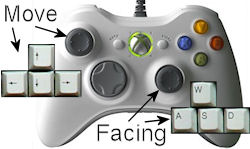
When manual control is turned on, you can control with either the keyboard (arrow keys for walking direction, and optionally WASD keys for facing direction) or with an analog controller, which I highly recommend. With an analog controller, such as an XBox 360 controller, the direction and speed can be controlled precisely with ease, while independently controlling facing direction with the secondary stick.
The terrain can be dynamically controlled with the sliders at the top. You can create stairs, slopes, and various combinations. The terrain will reflect the changes once the character has walked a little distance to the left or right. The sliders will also be changed at random while manual mode is not enabled.
Models and animations
The demo shows off three characters, all kindly provided by Unity Technologies. Press ENTER to switch between them, or press the switch button.
- The HERO character has 9 animation: 1 idle, 4 walking, and 4 running. The system automatically blends between the relevant animations based on direction and speed.
- The SOLDIER character only has 2 animations: 1 idle and 1 walking (forward). The walking is extrapolated by the inverse kinematics in the Locomotion System to also work for sideways and backwards motion, but it doesn't look as good as when animations are provided for those directions.
- The HERON character also only has an idle and a walking animation. (Note that the Heron model is facing in the -Z direction, so it's a bit odd to control.)
Features
A lot of the features I set out to implement are done by now. Still missing are:
- More intelligent foot placement mechanism that avoids ledges. The current system simply traces a ray from the heel of the foot.
- Some way to avoid feet and legs intersecting when walking in certain directions (usually sideways). Regular blending inevitably leads to this glitch, so special logic is required to handle this.
I will post more details on the technical details later.
Request for models!
I have tested the system with several biped (two-legged) characters but i am in DIRE NEED of animated models with more than two legs to test with! If you have any characters I may use as test data for this project, it would help me a lot. Models will only be used for testing and not in public demos unless explicit permission is given. Also, I will put a thanks in the Master Thesis.
The models can be anything really: animals, aliens, robots, or whatever, as long as they use legs to move around with! I can import models up to Maya 8.5 and in .fbx format. Animations work best with the system if:
- There is at least one idle animation and one walk or run animation. But the more, the better!
- The feet don't intersect too much with the ground (though a little don't hurt).
- The feet move backwards (for e.g. a forward walk) at a somewhat constant speed while on the ground (though the system can fix small variations).
If you are in doubt, just send away! Even animations that don't work still show me something valuable about the limitations of the system.
Help me test the system
I make the Locomotion System as my Master Thesis in collaboration with Unity Technologies. It will be available for free for users of Unity once it is finished.
As a part of my thesis, I want to test the usability of the system. If you are a Unity user and would like to try out the system and help me by evaluating it, please let me know! The system is not ready for testing yet, but it won't be long now.
Also, comments are much appreciated!
First Preview of Adaptive Walking
I just finished the first presentable demo. It is just one character with a fixed animation for now, and the foot step placement doesn't yet attempt to avoid intersecting geometry, but as an appetizer of what is to come, it will do. Click the image below to view the demo.
The demo above is made from just one animation that was made for walking straight ahead on a plain surface. There are two primary techniques that were used here to make the animation look quite acceptable when the character walk up or down steps:
- The system maintains the original ankle local rotation while the foot is in the air, and only enforces a re-alignment of the foot while it is on the ground. While landing on the ground and while leaving the ground, a blending between these two modes of operation is used.
- The system keeps track on when to use the heel and when to use the toe as the point of reference relative to the ground. This is based on which one is closer to the ground at any given point in time.
The features to be implemented next are:
- Blending between several animations.
- Support for walking on sloped surfaces.
- More sophisticated step length / step frequency mechanism.
- More intelligent foot placement mechanism that avoids ledges.
Anyway, I'm glad to finally have something to show, even if it isn't much for now. Comments are much appreciated!
My Old Walking System
Creating a system for adaptive animation for character locomotion in computer games is not only a very exciting master thesis project, it is also my opportunity to work with an idea I have had for a long time.
Back in 2001, when I was 18, I made rendered 3D animations in my spare time with the freeware raytracer POV-Ray. POV-Ray doesn't have a graphical front-end like 3Ds Max etc; instead you make your images and animations with a scripting language.
Among many other things, I made a walking system for POV-Ray. Here are some of the things it could do:
Making the system was a rather big challenge. POV-Ray has no support for keyframe animation so I had to make all animation 100% procedural and animate it by scripting! This was a very slow process and I never got as far with the system as I had in mind.
Now, using the Unity game engine, I am creating a walking system again. This one is different. In the system for POV-Ray (that was made for offline rendering) every step was calculated in advance. With the new system, characters need to respond dynamically from input from the player or from AI. Also, this time I have keyframe animation, skeletal animation, animation blending, and many other features at my disposal, which makes it easier to do more advanced things, but which also bring new challenges.
Although the new walking system for Unity will be very different from the old walking system for POV-Ray, I still think the video here will help make it easier to grasp what the system will be all about.
Walk and Run Cycle Analysis 2
In the past week I have been continuing my work on a script to analyze the movements of the feet in walk and run cycles. The primary new result is the analysis of foot lifting and landing times. By analysis the script finds these times for each foot:
- Lift time: When the foot begins to lift from the ground.
- Liftoff time: When the foot lifts off completely from the ground.
- Strike time: When the foot first touches the ground again.
- Landing time: When the foot has fully landed on the ground.
These times can be seen in the bottom graph in the interactive analysis visualization here. Click to activate it.
Note that the graphs refer to the ankle and toe of each foot. What they really measure is the ankle and foot positions projected onto the ground at the stance pose, i.e. points on the underside of the foot. Since these projected positions are approximately at the heel and toe, I will be referring to heel and toe positions below.
Previous work
Automatically finding the foot lifting and landing times can be tricky, especially if the animations that are being analyzed are not of the highest quality.
In the paper Adapting motion capture data using weighted real-time inverse kinematics by Michael Meredith and Steve Maddock, foot flight paths are extracted from motion capture data using a curve gradient analysis technique:
Our approach for retrieving the flight path from the motion capture data is based primarily on a gradient analysis technique where, over the course of the original motion, we analyze the height value of one of the character's feet. The first target we look for is a switch from a negative to a positive gradient on a frame that is within 10% of the global minimum height for the foot. This gives us the start of the foot flight where the foot is just about to leave the ground.
From the first target, we progress along the original flight path until we meet a second gradient change from positive to negative, which is on a frame whose height value is within 10% of the global maximum. This second target is the peak of our flight height. Continuing along the original path, we locate the third and final target via one last gradient switch from negative to positive, whose frame height is again within 10% of the global minimum. This technique is demonstrated pictorially in Figure 2.

I have been inspired by this technique by Meredith and Maddock. However, in my own tests I have found their procedure insufficient to properly handle the very varied animations I have used as test cases for my system.
Tricky animations
In my test animations, the feet don't always actually lift up from the ground when the legs starts to swing forward, but rather sort of drags along the ground. Also, the feet sometimes intersect with the ground, which also makes the analysis non-trivial.
In order to make the analysis error-tolerant in these kinds of scenarios, I have used several rules in combination to find the foot lifting and landing times.
New rules for the analysis
The new rules are highly dependent on the stance time which was described in the previous post. The stance time is the time where the foot is standing most firmly on the ground. Starting from this, the new rules are used to find the lifting and landing times fo the feet. The same rules are applied both for finding lifting and landing times, and they are used on both the heel and toe Y movement curves (i.e. vertical movements). They are as follows:
- Start following the Y movement curve from the stance time and forward (/backwards) until the height curve reaches 10% of the maximum height of the curve. The lifting (/landing) must come before this point.
- Inside this span of the curve, find the point with the maximum curvature (the maximum second derived of the curve, i.e. the most sudden rise in the curve).
- Disregard points on the curve that are below the ground level.
- Disregard points on the curve where the first derived (i.e. the slope) is below zero (or above zero when searching backwards).
These rules combined will almost surely find the point on the curve that intuitively looks like the point where the curve starts to rise from the ground. However, another check has to be made. This check is made for the foot Z movement curve (i.e. the swinging back and forth of the foot).
- Start following the Z movement curve from the stance time and forward (/backwards) untill the slope is more than 50% different than the slope at the stance time. Since the speed at the stance time is the point of reference for the ground, a speed that deviates more than 50% must mean that the foot is no longer following the ground, and thus no longer standing on the ground. If this time occur before the lifting time (/landing time) found by the other rules, then this time is used as the lifting time (/landing time) instead.
The 50% value here has been chosen by trial and error from the test animations. For a completely accurately animated character, the feet should be moving with a completely constant speed while they are on the ground since the ground is moving backwards with a constant speed relative to the character. However, this is not always the case in actual keyframed animations, and the speeds of the feet can be quite inconsistent. Thus a large tolerance value has to be used.
Motion synthesis next
The next step is to use the motion analysis data to synthesize adaptive walking and running animations. Using the lifting and landing times, the foot flight paths and the analyzed speed of each animation, new paths for each foot can be generated in accordance with the environment and variable movement of the character.
Walk and Run Cycle Analysis
I have been working on a script to analyze the movements of the feet in walk and run cycle animations. From this analysis the speed of the character can be determined, as well as when and where the feet touch the ground. Click to see the analysis in action here:
3 graphs
There are three graphs shown in the view.
- The bottom graph show the vertical movements of the ankle (red curve) and toe (green curve).
- The middle graph show the horizontal movements of the ankle (red curve) and toe (green curve). It also shows a black curve that is a weighted average between the ankle and toe curves.
- The top graph shows the balance of importance between the ankle and the toe, based on which is closer to the ground. This curve is used as the weighing factor for the black cuve in the middle graph.
Stance time and speed
Also, the analysis finds a "stance time" for each foot. This is the time when the foot is most firmly standing on the ground. The graphs are shown such that the stance time is always at the left side of the graph for all feet. This way, is is easy to compare the curves of the different legs and the different animations.
The stance time of a foot is determined by finding the point in time when the ankle height and toe height are as low as possible. It is important that they are both low, so rather than using the average of ankle and toe height, the maximum of the two is used.
By sampling the horisontal movement of the foot at points in time around the stance time, the overall speed that the character is moving with can be concluded. It is important to determine the movement of the foot from the part of the foot that is currently closer to the ground, thus the black curve from the middle graph is used. Using just the ankle movement or just the toe movement would give incorrect results.
Test data
I have tried to design the analysis such that it makes as few assumptions as possible. There are a few though:
- The character must be aligned with Y = up and Z = forward.
- The animation must contain only one cycle, i.e. one step with each foot. For that reason, skipping is currently not supported. There doesn't have to be any symmetry in the steps though, so e.g. a gallopping horse should work fine.
Currently the analysis method has been tested with a soldier character with a walk cycle and two run cycles as well as a robot character with a run cycle. I would like to test the system with many more characters and animations, including creatures with more than two legs, so I am currently looking into ways to get more material to test with. The goal is to create a robust analysis that can correctly interpret most animations that are thrown at it.
Adaptive Animation for Character Locomotion
I have just begun working on my Master Thesis, which I will be making in collaboration with the company Unity Technologies that make the awesome Unity game engine.
The Master thesis will be about "Adaptive Animation for Character Locomotion", which basically means creating a system for adapting walking, running, and crawling keyframed animations to a dynamic environment. The system will take curved paths, uneven terrain, and variable speed into account all the while ensuring graceful footsteps without slipping feet and motions that stay as faithful as possible to the original keyframed animations under the given restraints. Inverse kinematics is one of many techniques that will be involved in this.
Goals and perspectives
The system is meant to be generic in nature, working not just for biped characters (with two legs) but also for example for dogs, bugs, and spiders and, say, robots and aliens, provided that they move around using a limited number of legs. This list of features is the ideal case - time will tell how far I get within the timeframe of my Master Thesis. Hopefully I can continue working on the project after my graduation, if necessary.
In the end, the result of my work will be made available to all users of Unity free of charge, for any use. I hope to get people from the Unity user community involved in testing the system as it is developed, since one important success criteria is the usefulness and usability as perceived by the developers using the system. It will take some time before the first prototype is ready though, as I've only just begun.
The project up until now
My original "pitch" of the project to Unity was a presentation based on this slideshow:
A few ideas have already changed since that. For one thing, the idea that animators must enrich the animation cycles with additional data has been abandoned. The data needed is for example information about when exactly each foot leaves the ground and land on the ground again. The new plan is that this will be automatically analyzed and calculated by the system. More on that in a later post.
In order to quickly get my feet wet, I've made this little demo, where I have modified the Goober guy that comes with one of the Unity tutorials, and made his legs use some very simple inverse kinematics:
Click the image to make the demo run in the browser. Just click yes to install the Unity browser plug-in. Note that in this simple demo I simply adjusted the altitudes of the feet, so feet slippage etc. are not prevented. The actual system will work in a completely different way.
I have already gotten some interest and positive feedback in the Unity forums. Stay tuned!
runevision blog online
My website runevision.com has been online since 1998. Now, ten years later, runevision blog is started to make it simpler for me to communicate developments in ongoing projects and other things in my life.
For a start, the blog will mainly be centered around my master thesis project on Adaptive Animation for Character Locomotion, which I have just begun working on. For the next half a year, this blog will be a place for myself and others to track the progress of the project, see the ongoing results, read about the thoughts behind the technical details, and roll eyes at the occasional silly remarks.
The master thesis marks the end of my education in Multimedia with specialization in Games Programming at the University of Aarhus, Denmark. After my graduation, I am looking forward to a carreer in the game industry as a games programmer. Well, enough background - you can always go to runevision.com for more. The blog is now officially open.
(Note: Post appearing before this one have been migrated retroactively from my own news entry system.)
Website makeover and new artwork
Website makeover! Finally, rune|vision has gotten a completely new design. The six years old dark and blue angled design has been replaced with a bright smooth lime and orange design, aimed to make it look more professional, and the content has been revised as well. Hope you like it! I've also uploaded my 3D image series Metal & Flowers, which is my most ambitious artwork yet, and an exercise in playful ironic contrasts, both visually and thematically.
FLIPSIDE is IGF Student Showcase winner!
Our Team 3 game production FLIPSIDE is a 2008 Independent Games Festival Student Showcase Winner! It's a huge honor, and I and two other guys from Team 3 are going to San Francisco by February to show off our game at the Game Developers Conference, attend the IGF Awards Ceremony, and talk with people in the business. :D