Field Report from GDC 2010
I've been spending the last week in San Francisco attending the Game Developers Conference and showing off Unity at our awesome (and very busy) booth.

Booth Experiences
The people I've met have been very excited about Unity; both our product in general and about the new features we'll be releasing in upcoming Unity 3 this summer and which we previewed at the booth. Unlike last year, there were practically no people this year who hadn't heard about Unity some way or another.
IGF Impressions
The Independent Games Festival awards show was great. I was especially excited about Danish guys Playdead winning no less than two awards for their game Limbo and other Danish guys Press Play winning an award for their Unity game Max & the Magic Marker for Wii, PC, and Mac. I've had a chance to play both, and they're both excellent games. Coincidentally they're both side-scrolling platform games with a strong puzzle focus, but besides that they're completely different.
Animation Insights
I only got to see one session this year - Player Movement and Animation in Drake's Fortune 1 and 2. It was very well presented. Everything was sensible and easy to understand; there was nothing ground-breaking but a lot of useful tips and tricks. With the exception of one thing that was purely done to save memory (flipping animations on the left-right axis), everything they did could be done in Unity without problems. They basically rely on lots of animation blending, some of the animations applying to only part of the skeleton, and some animations being additive; all things that are supported in Unity. They also do some IK fixes, which of course can be done in Unity with scripting.
Their method for making characters standing and moving correctly on uneven surfaces is a little similar to how my Locomotion System does it, just a bit simpler: They too use raycasts to find the ground height for the feet, then adjust the hip/root height, and then use IK to adjust the legs.
The most interesting thing they did was having a few long animations with random wiggling of the character. By applying this on top of a 1-frame idle animation they get a nice long, varied idle animation, but it means they can have lots of different idle animations that are all just 1 frame long which turn into nice animations when the wiggly-animation is applied on top. They do similar things with walking and running to add variation that can span over a long time but doesn't require much space because it can be reused for many different animations. Perhaps we can add something like that for our new Unity 3 launch demo that we're working on.
Going Home
It's been a long and hard, awesome week, and I've met lots of great people, but now I also look forward to going home again. I'll be arriving back in Copenhagen on Monday, and once I've recharged a little I'll be continuing working on getting Unity 3 out.
3rd Person Shooter Unity Demo

At work I've been working on a Unity demo to demonstrate various animation techniques, and I ended up making it into an actual game (albeit a small one). You can read more about it - and play it! - here:
New Character Animation / 3rd Person Shooter Demo
It's based on a tech demo that Paulius Liekis and I did for a presentation at Unite '09. You can see a video of the presentation here:
What I did at Nordic Game Jam
This weekend I participated in the Nordic Game Jam - the first and biggest instance of the Global Game Jam event.
The basic idea is that lots of people meet and split up into small groups that each make a game in about 40 hours. That's some seriously intensive game making, which is very exciting and fun (and exhausting). Because the games are so small and quick, there is unlimited room for wild experimentation which would not often be risked in larger scoped games with more serious commitments.
In my group we made Preschool Theater Director - a game where you have to direct a chaotic set of pre-school kids in order to enact Shakespeare's "A Midsummer Night's Dream" on the stage in front of a demanding audience of parents. You can play it online here via the Unity browser plug-in.

The game is over quite quickly (if you can remember the names of the children anyway) but the graphics and sound design and general sense of attempting to direct small clueless kids makes it for a funny experience.
Florian Sänger made the graphics, Bernie Schulenburg the sound and voices, Kasper Clemmensen produced the music, and Nils Deneken contributed with bits here and there though he was busy working on another game at the same time. Lau Korsgaard helped with some initial prototype programming before family commitments took over. After that I was the only programmer on the game which made me somewhat of a bottleneck, but I'm glad we got it into a state where it's fully playable and actually a bit of fun.
Master's Thesis now online
My Master's Thesis is now finally online:
Automated Semi-Procedural Animation for Character Locomotion

I would have made it available earlier, but the University took three months reviewing it, and I wanted them to be done with it first.
The 114 page thesis thoroughly discusses almost all parts of the implemented system and compares the used techniques and methods with related academic work on the subject. Here's the abstract:
This thesis presents a framework of techniques for interactive synthesis of highly flexible character locomotion. The system uses a set of example motions primarily in the form of keyframed or motion-captured walk and run cycles. The system automatically analyzes each motion at design-time and extracts parameters such as impact and lift-off times for each foot as well as overall velocity. At runtime the system first blends the motions according to the current velocity and rotational velocity of the character, it then adjusts the movements of the bones in the legs by means of inverse kinematics to ensure that the feet step correctly on the ground. The system works for both human and non-human characters with any amount of legs and in whatever style the provided example motions are in. It can adjust animations made for a specific speed and direction on a plain surface to any speed, direction, and curvature, on any surface, including arbitrary steps and slopes.
Notable innovations in the thesis include the introduction of the concept of a footbase, which is a single combined heel and toe constraint that can retain the important information about the alignment of a foot relative to the ground; the calculation of a supporting ground height that can be used to produce motion with a good sense of weight, regardless of the number of legs and of the gait style; the calculation of natural-looking foot alignments that works for just about any characters and gait styles, and a scattered data interpolation algorithm that has desirable properties when interpolating motions with different velocities.
The thesis has plenty of diagrams and illustrations to help presenting the new concepts and techniques. The accompanying videos also help in that regard.
Having finished my Master's Thesis doesn't change a whole lot in my life in practice. I've already been employed full time at Unity Technologies since February and I will be continuing my work there helping continuously improving the Unity game engine and authoring tool. (My blogging for Unity can be seen here by the way.)
That said, I'm very happy to finally be done with this academic endeavor. This also marks the end of the almost exclusive focus on the Locomotion System on this blog. My future blogging here will probably be centered around more broad game development related subjects, though I won't be shy of occasionally diverting even from that topic if I should feel like it.
As always, the Locomotion System itself can be downloaded here and it is free to use in any Unity game.
Fully Automated Blending, Revisited
One of the things that makes the Locomotion System easy to setup and use is the fact that it automatically analyzes the velocities of all the input walk and run cycles and plots them into a velocity map. At runtime the system automatically assign appropriate blending weights to the animations, such that the closest neighboring animations (in terms of their velocities) get the highest blending weights.
While developing the system I tested this blending with as few as 2 sample animations (1 idle and 1 walk cycle) and with a much as 9 (1 idle, walk cycles in 4 directions, and run cycles in 4 directions).
A user in the Unity community, Chris Mansell Aka. Capnbubs, has now posted an early preview demo of a game he is developing, which utilizes the Locomotion System. In it, the avatar walks and runs with easy in a landscape with cliffs and hills.
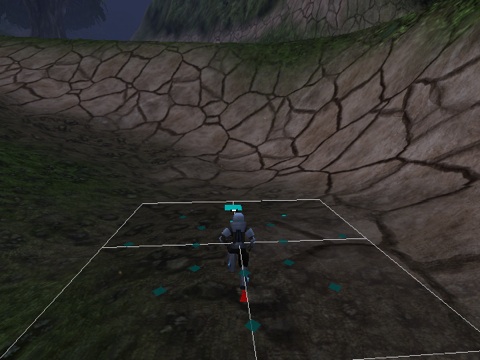
Chris informs me about the animated character:
I've got walk and a run animations, each in 5 directions, three of them mirrored for moving backwards.
In other words, walk and run cycles in 8 directions, which makes for a total of 17 animations when also including the idle. The image above depicts a visualization of the velocities of the animations plotted into the velocity map.
I only ever tested with half that many animations myself, but the automated analysis and the runtime blending based on scattered data interpolation ensures that it still just works out of the box. Also, the built in ability to make an animation double as its backwards equivalent means that Chris effectively got 17 animations although he only made 11.
Locomotion System GDC 2009 Slides
My lecture at GDC about my Locomotion System went really well I think. I've had some requests for the slides, and they're available here:
Dynamic Walking with Semi-Procedural Animation (PDF, 16 MB)
Note that the presentation included quite a few videos which are not in the above slides, so a few points may not come properly across if you did not see the presentation at GDC.
GDC may at some point make a recording of the slides available, complete with audio. I don't know if that would also include the videos I presented. I'm not so sure of the details. If anybody finds out, please let me know!
Locomotion System 0.9.4 out now

The Locomotion System has been released in a new version. It is available for download at the Unity website:
The new version has several improvements and bug fixes that prevents some problems that some people were experiencing, and which make the motion smoother in certain cases. It also has a new scene file for improved visualization of the motion curves that are automatically analyzed by the system.
Locomotion System at GDC 2009 update

The Game Developers Conference 2009 is very close now and I will be doing a 60-minute lecture in the Programming track on the subject of:
Dynamic Walking with Semi-Procedural Animation
(Follow the link to see the session description on the GDC website.)
Time: Friday (March 27, 2009), 4:00pm - 5:00pm
Location: Room 2018, West Hall
Unity 2.5 released for Mac and Windows
Version 2.5 of the Unity game engine and authoring tool has finally been released and is now for the first time available on Microsoft Windows too.
Unity is the engine I've used to develop the Locomotion System with. Unity is gaining popularity like mad these days and has been used for so many cool games for Mac, Windows, web browsers, iPhone, and Wii.
Besides Windows authoring support, Unity 2.5 primarily bring improvements to the authoring tool, including a fully customizable tabbed interface and improved support for creating custom editor windows.
I also work for Unity Technologies now, and we'll be proud to show off Unity at GDC 2009. We'll be in booth #5110 in the North Hall.
Locomotion System at GDC 2009!
The Game Developers Conference 2009 is near and I am proud to announce that my session proposal has been approved! I will be doing a 60-minute lecture in the Programming track on the subject of:
Dynamic Walking with Semi-Procedural Animation
(Follow the link to see the session description on the GDC website.)
I am honored to be presenting my work in the company of the great minds of the game industry at such an early point in my career. This is the second time I am going to GDC and I am truly looking forward to it.
Updated Interactive Demo
Now, since I'm updating the blog anyway, I have thrown in the latest version of the uneven terrain demo that I have used as a testing bed for the Locomotion System. New in this version is a coyote, as well as lots of visualization options that you can play around with to get an idea of the inner workings of the system. This is the same version that was used for the Video Demo 2 of the Locomotion System in the previous post.
Instructions for the demo
| Command | Keyboard | Gamepad |
|---|---|---|
| Walking-direction | arrow keys | analog stick 1 |
| Walking-speed | shift | - |
| Facing-direction | W, A, S, D | analog stick 2 |
| Jump | space | button A |
| Time slow down / speed up | numpad - / + | - |
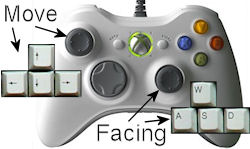
You can control the characters with either the keyboard or with a game pad. With a game pad, such as an XBox 360 controller, the direction and speed can be controlled precisely with ease, while independently controlling facing direction with the secondary stick.
In this demo the terrain can be dynamically controlled with the sliders at the top. You can create stairs, slopes, and various combinations. The terrain will reflect the changes once the character has walked a little distance to the left or right. Enable manual mode to control the character yourself, as described above. This demo uses four animations for walking (forward, backwards, and sideways) and also four for running.
In other news
Besides having my session at GDC accepted, a few other notable things have happened recently:
- I have moved from Aarhus to Copenhagen (both are cities in Denmark; Copenhagen is the capital) together with my girlfriend.
- I have started working at Unity Technologies, a company making an extremely cool game engine and authoring tool called Unity.
- I am still working on finishing my Master thesis about the locomotion system ... it will hopefully be done soon!
That's it for now. I hope to see you at GDC!