Forcing Structure in Procedural Spaces

The procedural game I'm working on in my spare time, The Cluster, has a focus on non-linear exploration and is set in a big, continuous world. When I've let people play it in its current state they've been happy to roam around at first, but quickly become bewildered from a lack of sense of direction and purpose because they could go so many places but had little idea of what they're supposed to do other than running around aimlessly. That got me thinking about ways to direct the experience better.
In Part Six of his series on Proceduralism, Andrew Doull recently wrote:
Populous, Dwarf Fortress, Minecraft and Terraria all cheat procedural generation in two important ways: they allow you to modify the topology of the space and they encourage you to make interesting content in that space to which you become attached. An uninteresting dead end can be transformed into a useful corridor, or lit by a torch to mark that you've 'already been here' or mined for valuable ore. The procedural generation systems they use may make beautiful places, but it is the player's job to change them into interesting spaces.
This sums up the situation pretty well - and if we ignore the building aspect, other games like Spelunky can be added to the list as well. The choice of wording "cheating" can be discussed, but it's certainly a way to circumvent one of the biggest challenges of procedural generation: To make the environment interesting and challenging while still ensuring that it's never impossible to traverse.
Non-Modifiable Environments that Direct the Player
In traditional games it's in general not possible to add or remove from the environment (i.e. Mario, Sonic, Zelda, Metroid, you name it; almost all games are like that). If the player could just dig or blow up a hole anywhere he wanted, it would ruin the carefully constructed challenge. So these games ensure traversability not by allowing the player to change the environment, but by ensuring that it's traversable from the beginning. And that's not hard to do in manually designed levels. If it's not possible to traverse a location, the designers will find out when testing it and then just change it.
For games that are procedurally generated at runtime, it's not always possible to test any level or environment prior to release because there may be an infinite number of them. The above mentioned games circumvent this problem by simply not giving any guarantee that the environments are traversable, because the player in those games can always dig or explode a hole almost anywhere to create a passage where there wouldn't otherwise be one.
Non-Modifiable Environments in Procedural Games
So modifiable environment lifts a big burden from the procedural generation problem in those games. However, some people - like me - still like more traditional games a lot where you have to deal with the given environment rather than just being able to dig a hole through it. Games where the experience is a bit more structured and directed instead of relying entirely on the player creating challenges for himself.
Creating procedural environments that do have a traversability guarantee imposes a lot more restrictions on the generation algorithms, and I find it to be an interesting and worthy challenge. My efforts in that direction can be seen in The Cluster, my 2.5D platform game under development with focus on non-linear exploration. (You can read all the posts about The Cluster here.)
Spatial Algorithms that Create Structure
So what kinds of algorithms can be used to create environments that structure the game experience and guides the player?
Before talking algorithms, it's useful to look at what structure and guidance techniques are used in games in general, including non-procedural games.
- Linear progression is the simplest way to structure and guide the player. Simply move on forward; it's the only way to go!
- Keys and locks is a way to break up linear progression, whether it's literal keys and locks like in Commander Keen and Doom, or other variants like switches that causes a door elsewhere to open, a bridge to extend, or a hazard blocking the way to disappear.
- Non-linear games often have features of unlocking new regions when some threshold is met, whether it's experience points in RPGs or number of collected stars in Super Mario 64.
- Non-linear games may also grant the player new abilities that are required for certain parts of the world. This effectively is also used for unlocking new regions, but at the same time the ability is also used as a normal part of gameplay within those unlocked regions. This is especially popular in games in the Metroidvania genre.
There's many other techniques, but these are sufficient for this discussion.
For linear games, there's no need for algorithms to structure the experience and guide the player, since the structure and guiding is inherit in the linearity itself. Making the game interesting is still a challenge though, so algorithms are needed for that. This comes down to the moment to moment gameplay, and is very dependent on which type of game it is.
Importantly, making the moment to moment gameplay interesting is needed in any case, no matter if the game is linear or not.
Simple key and lock puzzles can easily be implemented procedurally. I wrote a bit about it here where there's also a playable demo of it, but it's also described well on Squidi.net.
Unlocking parts of the world, whether it's based on collectibles or on gained abilities, should also be more or less simple to implement. I know others have done it already and I'm currently experimenting with algorithms for it myself.
Now, in his article, Andrew Doull also wrote:
My procedural spider senses tingle as soon as I see a procedural generation system that uses one of the following two approaches: 1. Mazes (and by extension BSP-trees) 2. Height maps - because I've yet to play a game where I've exclaimed 'Wow, what a great height map' (...) and the pleasure of solving a maze isn't the same as the pain of having to play through one. I've also seen a rise in recent suggestions and several implementations of Metroid-style procedural generation featuring gated lock-and-key puzzles to partition a map, on the assumption that being forced to traverse through a non-linear space looking for a key is some how interesting. This is putting the cart before the horse: Metroid (and Zelda) use this technique to force the player to explore an already interesting (and hand-designed) location, not because looking for a key is itself challenging.
This is missing the point, I think. Of course the locations and the moment to moment gameplay in them needs to be interesting. Just like a linear game with no challenges (say, just walking from left to right) would bore you to death, so would a game with a different guiding structure, such as keys and locks, or progressively unlocked regions. But that doesn't mean that those guiding structures have no merit or importance. Indeed, just like they were important in Metroid and Zelda, so they can be in a non-linear procedurally generated game.
They have more merit too than just to "force the player to explore an already interesting location". They serve at least three additional purposes:
- To prevent player confusion and bewilderment at having too many open possibilities, especially in the beginning. An open world where there's access to everything from the start can give a sense of lack of direction or purpose which can be very off-putting - more so for some people than others. This is why most open and "sand-box" games still have clearly defined "main missions" that can be pursued, and certain options, areas, or missions that are not accessible until further into the game.
- To give the player a sense of reward when a new part of the world is unlocked.
- To keep things fresh and interesting by saving some things in the game for later.
To dismiss an interest in such guiding structures as "putting the cart before the horse" only makes sense if some people think that a game can consist of these guding structures alone with no gameplay beyond that. But I'm not sure who ever claimed something like that.
Room and Corridors versus Mazes
In his article, Andrew also writes:
The most successful (and perhaps only successful) procedurally generated game spaces so far are all based on Rogue, with its simple room and corridor design. With a room and corridor design we get four important features:
- Corridors - which act as natural choke points at each end, and cover if you are in them
- Convex shapes - spaces where you can see everything in the space from everywhere else
- Concave shapes - spaces where some space is hidden from another (more cover)
- Loops - which allow you a safe haven by traversing the loop to recover when chased by enemies of the same speed or slower
But it's obvious that these success criteria are coupled tightly with Rogue-like gameplay and have little relevance to many other types of games.
In any case, I have a hard time seeing how this room and corridor design is superior over a design based initially on a maze. The room and corridor design connects rooms in a web that gives very little control over the progression of the player through the area, as far as I can see, since there's an undefined number of ways to get from one point to another.
In contrast, a design based initially on a perfect maze (a maze with no loops) has only one way to get from any point to any other. This means that obstacles or challenges can be strategically placed at positions that the player cannot avoid - in other words it gives actual control over choke points at a global scale if so desired, whereas the room and corridor design may create local choke points, but won't guarantee the player has to pass through them.
The important point here is that mazes can still provide all those other features as well.
- Rooms? Just place rooms in the beginning before the maze algorithm has run. Rooms could define locations with potential entrances or required entrances, and the maze algorithms will make sure to connect them up (but without forming any loops). I have that feature in my own maze algorithms and use it to place predefined rooms where artifacts are located.
- Loops? After the maze algorithm has run and after required global choke points like locked doors have been chosen and placed, just carve some additional corridors/tunnels, maybe starting from some of the dead ends left by the maze algorithm. When doing so, prevent connecting parts of the maze that are on opposing sides of a global choke point (like a locked door).
- Avoiding dead ends? Dead ends can easily be made non-pointless by placing rewards there (or keys to locked doors), but they can also just be removed in a pass that runs after the maze algorithm that removes any dead ends that haven't been assigned any purpose. The algorithm can also be made to leave a certain number of dead ends in, or give preference to removing long dead ends or short dead ends, depending on what is wanted.
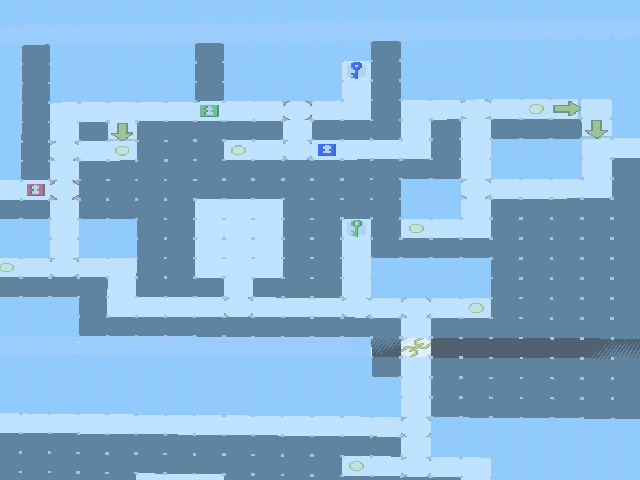
The important part here is that using a maze algorithm does not imply that the result will look and feel like a maze. It's just an algorithm to get things done, and the useful part is that at one point during the generation there's exactly one way to get from any point to another, although this doesn't have to be the case when the whole generation is completed.
The Cluster: Video of New Environments
This post is about The Cluster, my 2.5D platform game under development with focus on non-linear exploration, set in a big, continuous world. You can read all the posts about The Cluster here.
In the last post I wrote about how I've improved the edges in the environment generation of The Cluster. But the background scenery was basically just parts of the foreground extended far into the distance which was not terribly interesting to look at.
Since then I've implemented generation of more interesting backgrounds with hills and cliffs and forests. The background scenery can be seen in the first half of the video here.
The video shows a green hilly environment and an underground dungeon style environment. There's no enemies in this demo and many objects are still placeholders - the focus is on the terrain itself.
The background is somewhat faint (due to aerial perspective) and blurry and isn't meant to steal the attention away from what's happening in the foreground, but having interesting detail in it can nevertheless add a lot to the overall feel.
Another thing to note in the video is the dynamic camera framing. It zooms the view in and out and places the player nearer the top or bottom of the screen as necessary based on the surroundings. It's something I may go into more detail with in a future post.
Firefox 5 breaks my blog?
I just upgraded from Firefox 3 to 5 and find that my blog is shown without a stylesheet at all. It still works fine in Firefox 3, and latest Chrome and Safari and I assume other browsers too. And the rest of my site still works fine in Firefox 5 too; it's only the blog part that's broken.
Update: It appears it was the stylesheet that was not recognized. I had my stylesheet inside an .asp file to be able to execute server-side code in it. That has always worked just fine but it appears to break when the browser is Firefox 5 AND the site linking to the stylesheet is on Google's Blogger service. When the same stylesheet is linked to from the part of my website that's hosted on my own server, it works fine. The stylesheet is hosted on my own server in both cases, so how it can make any difference where the html page is hosted I do not understand. In either case, baking the stylesheet into a static .css file and linking to that instead seems to have fixed the problem.
The Cluster: Sweet Sweet Edges
This post is about The Cluster, my 2.5D platform game under development with focus on non-linear exploration, set in a big, continuous world. You can read all the posts about The Cluster here.
Last time I posted an update about The Cluster was - 10 months ago!? Well, development hasn't been idle though - far from it! - it's just that I've been working on some refactoring and changes that ended up being rather time-consuming. Some big hurdles are now over and blog updates should hopefully be more regular going forward.
One of the most recent features I've implemented is handling of smoothing and texturing of edges. This has been on my todo-list since forever but I had to switch to a better way of generating meshes before this became feasible.
Consider a generated environment with surfaces that meet each other in sharp edges:

The surfaces look weightless like they're made out of cardboard. No offense to MineCraft, but it's not the look I'm going for. Let's smooth those edges a bit.

Better. The environment now has a certain weight to it; it feels more solid. But the abrupt edges between surfaces with different textures still makes it seem artificial and less believable (believable not in the sense of realism as I'm not going for that, but in the sense of suspension of disbelief). Let's cover up those abrupt changes in texture.

Ahh! With the edges of the textures covered up with natural-looking transitions, the world has finally come alive and is more inviting than ever.
A few more examples of the current look of The Cluster (don't mind those ugly green box stepping platforms and spikes. They're placeholders I haven't yet replaced with something better):


Most of the textures are made with good old POV-Ray by the way; the raytracer I used to work a lot with back in the days.
The environment is controlled by a neat system of specifying block types, face types, and edge types. Each "cell" in the world (think big voxel) is of a specific block type, for example "Bricks" or "Empty". The procedural generation algorithm fills in the block types of all cells in a generated area prior to constructing the mesh.
A block types specifies the face types it has. For example, this is the data for the Bricks block type (here called EnvironmentData but I should rename that):

All faces here uses the BrickWall face type, except the Up face which uses the Grass face type. Here's the data for the Grass face type:

The face type specifies the material to use for the face surface, as well as edge data for convex, flat, and concave edges. The edge data is used to specify rounding size for an edge as well as the material, width, and UV data for the textured strip that is generated over the edge.
This is an example of an edge texture (diffuse channel):

This one is of course extremely wasteful, but the system is already set up so multiple edges can be contained in one material; I just need to change my texture so they actually make use of that.
Currently it's not possible to differentiate the different edges of a face but I'll need to add support for that so different edge data can be used for edges that are "along U" and "along V".
When generating geometry an edge is of course shared between two faces. The priority value of an edge is used to settle which of the two faces get to use their edge data for the edge.
When I had to set up the relationships between block types, face types and edge types, that was the first time the data got too unwieldy for me to hard-code directly in the code. Instead I turned to Unity's ScriptableObject, as I wrote a short post about here. Using the ScriptableObject means that Unity's Inspector can be used to specify the data, and Unity's serialization system automatically takes care of everything related to storing and loading the data. At some point I'll probably write some custom editor GUI for the data too so it becomes easier to comprehend and get an overview over.
And that's all I have to say about edges!

Unity's ScriptableObject and Threading
I found a pleasant solution to a problem I had in Unity that I thought I'd share. This post is technical in nature and won't be of interest to people who don't use Unity.
In my procedural game I'm doing a lot of lengthy calculations and I've been looking into doing them in a separate thread in order to easily spread out the calculations over multiple frames. Using co-routines for this was getting overly convoluted, with yield statements and StartCoroutine() calls sprinkled all over the code-base.
Threading is supported in Unity using the normal .Net (or more specifically Mono) APIs for threading. However, the Unity API can't be touched in anything else than the main thread, or errors will occur. Luckily the lengthy calculations are mostly self-contained and are not touching the Unity API.
However, the calculations do use some data structures that are stored in the form of ScriptableObject. Using ScriptableObject is the simplest way to store some data in Unity with automatically handled serialization. Also see Bas' explanation here.
The problem?
- Querying the name of a ScriptableObject can't be done outside of the main thread.
- Doing equality comparisons between ScriptableObjects can't be done outside of the main thread. This includes checking if a ScriptableObject is null.
These are things I can't avoid in my code. So instead I came up with this derived class that I now use for all my ScriptableObject needs:
using UnityEngine;

public class ThreadFriendlyScriptableObject : ScriptableObject {

    // Hide the name property with a public variable of the same name.
    // (Also hide this in the Inspector.)
    [HideInInspector]
    public new string name;

    // Set it to be the same as the property was.
    // (OnEnable will be called from the main thread so it's ok here.)
    void OnEnable () {
        name = base.name;
    }

    // Override equality operators to avoid calls into
    // the Unity API when doing comparisons.

    public static bool operator == (
        ThreadFriendlyScriptableObject a,
        ThreadFriendlyScriptableObject b
    ) {
        return object.ReferenceEquals (a, b);
    }

    public static bool operator != (
        ThreadFriendlyScriptableObject a,
        ThreadFriendlyScriptableObject b
    ) {
        return !object.ReferenceEquals (a, b);
    }

    public override bool Equals (System.Object other) {
        return object.ReferenceEquals (this, other);
    }

    // We get a compile warning if we don't override this one too
    public override int GetHashCode () {
        return base.GetHashCode ();
    }
}
Everything works great for me using this class. There's a few limitations of course:
- You won't be able to access or modify the actual name of the ScriptableObject. This is not a problem unless you need the name to change.
- You won't get Unity's nice behavior of making a reference to an Object look like it's null if the Object was destroyed. This is only a problem if you plan on destroying the ScriptableObjects at runtime. Since the main function of ScriptableObjects is to be persistent assets, you're not likely to want or need this.
Use at your own risk. :)
My 3rd Person Shooter on Kongregate
OMG the 3rd Person Shooter demo I made in the beginning of the year has ended up on popular web games portal Kongregate. The game has had 20,000 plays so far and counting and has a rating of over 4.1 out of 5. I'm totally flattered. :D
UPDATE: Kongregate took down the demo after enough other Unity games had been submitted that the demo was not needed to demonstrate Unity anymore.

I made the demo at work at Unity back in the beginning of 2010 to demonstrate various animation techniques, and I ended up making it into an actual game (albeit a small one). Since then it has been possible to play it on the Unity website. The demo was based on a tech demo that Paulius Liekis and I did for a presentation about animation techniques at Unite '09.
So the reason it ended up on Kongregate: Kongregate, which used to host only Flash games, has just announced that they have opened up for Unity games too (and they're having a grand Unity Game Content to kick it off!). They wanted to show their users a simple demonstration of just how great things can be made with Unity, and they picked this Unity demo for that purpose.
So - a little known fact is that I did the voice work for this demo; totally unprofessionally too, but it brings a lot of humor to the game. Reading the comments from users on Kongregate, it seems that it's appreciated. :D
A lot of the comments a very positive or out right hilarious. A few examples:
"Takes long to load, but definately worth it. 5/5"
"Wait... This is an actual 3-D game, without lag... And it's not one of those ones with just 3D sprites and whatnot... YES!... YES!... THIS IS DELICIOUS!"
"Cant wait for the sequel Unity demo 2: Better run! and the spin-off game "how do I get behind it?" and don't forget the T.V gameshow "YEAH, Ha Ha, Take THAT!""
"ZOMG!!! love the voice"
"should i pull out my second gun to shoot it with? nooo! why would i do that?"
"lol i love the voice acting :)"
"WOOT! I lost in no fail mode! Robot sploded on my head +)"
"i like the ragdoll physics unity 3d has (this and dead frontier) its fun i killed it on medium ran towards it and BOOM i went flying"
"This. Is. So. Mother. Freaking. Awesome."
"AMAZING Graphics! I Have To Say 5/5 I'm Gonna Devo For This ;)"
"This is actually real?!?! Oh my God the graphics..."
"This game could change the history of kongregate. 3D games Zero lag."
"best graphics on kongregate ever"
"R.I.P. Flash 'Nuff said?"
"BOOOM!sorry that was just my BRAIN exploding from awesome!!!!!!"
I'm famous! Well, except the thing was not posted in my name so nobody will know. Oh well. :P
Procedural Animation Increases Engagement
A new study confirms that procedural animation in a game, such as the Locomotion System I developed for my Master's Thesis, can improve not only the visual impression of the game, but also increase the overall player engagement significantly.
I was contacted some some ago by Chelsea Hash, a digital media student from the Polytechnic Institute of New York University. She had just finished her own Master's Thesis Reactive Animation and the Play Experience which included a social psychology experiment on the affect of dynamic animation systems on the user experience. The semi-procedural animation system used as part of the experiment is based on the Locomotion System I developed. She told me:
The study found that given four versions of a game with the only variation being the avatar visualization and animation system, the semi-procedural animation system consistently had a positive impact on the game experience. Users consistently ranked the procedurally animated version higher and played it for longer. This effect was found to be subtle and often beneath the user's ability to consciously identify the difference.

I find this highly interesting! My Master's Thesis and many other technical papers about animation techniques simply take for granted that animation techniques that makes characters more physically situated in the game environment increases player immersion - but this study actually tests this hypothesis, and finds that players become more engaged at a general level as well.
Her Master's Thesis is part of her studies at the Social Game Lab where research is conducted that addresses the subconscious qualities in design that make quality interactions. You can read more about Chelsea's work at her website, livelydisposition.com.
For anyone interested in using this form of dynamic animation in their own games (to enhance player engagement!), the Locomotion System can be used for free in any game authored using Unity - get the Locomotion System project folder to get started.
The Cluster: Demo of Hunting AI and New Models
This post is about The Cluster, my 2.5D platform game under development with focus on non-linear exploration, set in a big, continuous world. You can read all the posts about The Cluster here.
Like I wrote about a few weeks ago I've been working on pathfinding and AI for the enemies in The Cluster. The AI pathfinding is now reasonably stable and there's a working demo below where you can fight against simple hunting enemies. Right now the enemies always know where the player is; later the knowledge of most enemies will be made less global and more based on local memory.
I've also been working on some new character models and animations. The new animations in particular bring the player avatar and enemies a lot more alive! Even though I'm a complete amateur as an animator, the crude animations I've made still make the character a lot more fun to watch, I think. :)
Here is a simple playable demo of the current state of the game (requires Unity plug-in):
Controls: Arrows to run, Ctrl to jump, Alt to shoot fireballs.
Again, this demo is just a "tech demo" and features no way to win. It extends infinitely to the right. Enemies should be able to chase the player almost everywhere, but they can't pass the checkpoints (the white monuments).
Like I wrote about before, I'm still not sure what gameplay elements would be best at making agile enemies like these the most fun in a platform game. Have a go at the demo above and then let me know if you have some ideas for how to make this gameplay more fun!
The Cluster: Demo of Procedural Environment
This post is about The Cluster, my 2.5D platform game under development with focus on non-linear exploration, set in a big, continuous world. You can read all the posts about The Cluster here.
I'm taking a break from pathfinding and AI to go back and talk about the raw level design in The Cluster; More specifically the procedural generation.
The entire world in The Cluster is procedurally generated at runtime, though it is consistent, meaning that the world will be the same every time you play. However, this is strictly a design choice, not a technical limitation, and I'm considering including some kind of bonus areas or similar that will be different every time.
To give you an idea of the current state of the game, here is a simple playable demo (requires Unity plug-in):
Controls: Arrows to run, Ctrl to jump.
This demo is just a "tech demo" and features no enemies and no way to win. It extends infinitely to the right.
Back in 2007 I explained the procedural level generation of the game. The game has changed a lot since then - among other things it has turned from a tile based 2D game into a 2.5D game with 3D graphics - but the basic method of generation is still the same.
You can actually see the maze map in-game in the demo above by pressing 2. Press 1 to hide the world to only see the map. You can zoom a bit out by pressing Z, X zooms back in, and you can pan around using WASD. Press Esc to reset the camera.

A map of the maze that the area is based on.

The map overlayed onto the actual generated area.

The generated area by itself.
One feature not explained in depth on the page linked to above is the placement of locked doors and keys in the game. The game places locked doors and keys in a "perfect way" such that it is always necessary to find all keys and unlock all doors to be able to proceed, and a "deadlock" will never occur, where the key for a door is placed behind that door. The placements are calculated using a simple algorithm I came up with which is based on dividing the area up into a binary tree and then placing keys in leaf nodes and locks in inner nodes in a specific way. Several years after implementing it, I found this article about "Environment Tree" at Squidi.net. It's basically the same algorithm, so rather than explaining it myself here, I'll refer to that.
A nice aspect about the algorithm is that it supports placing keys both sequentially and nested. In the screenshots above, the red door is sequential in the sense that all the following keys and doors are on the far side of the red door, so once you've gone through it, you don't have to go back. The green door, however, is nested. You go through the green door, pick up the blue key, and then go back out the green door in order to proceed. The algorithm doesn't have separate handling of sequential versus nested key and door placements; these are just emergent properties so to speak.
If there's any interest I can cover other aspects of the procedural generation in The Cluster in coming blog posts.
Maze Raiders: Good Old Two-Player Fun
Maze Raiders is a two-player game I made together with three other people back in 2004. You need to sit two persons by the same computer to play the game.


The objective of the game is to run around in a maze and collect more gold coins than your opponent, and to shoot him and steal his coins. The game sports randomly generated mazes each time you play to keep it fresh. There's two different scenarios - jungle and pyramid. It's classic local two-player fun!


Though we were all game design novices, we managed to balance the rules to make for a frantic game that just keeps being fun to go back to. When all coins in a maze are collected you have one minute to try to steal coins from your opponent. During this time the player with fewer coins moves faster than the other player. It's just enough that it's not too late to change the tides, and it makes for a panicked final chase before the time runs out, sometimes with the roles switching multiple times.
In 2004 when the game was made there was no indie game movement to speak of so we had nowhere to announce the game - particularly a game of such a small scope. All we could do was submit it to software distribution services like Tucows and FilePlanet. Ha, things sure have changed since then! I thought I'd take this opportunity to put the game online and let others know about it. Enjoy!